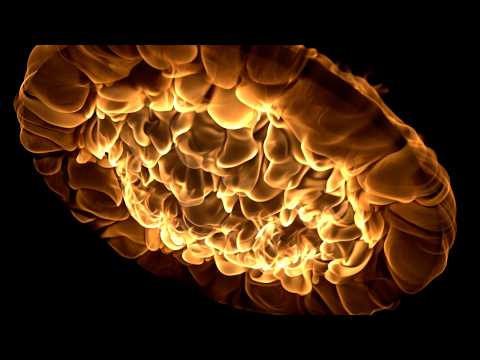
How to Film Fire in Slow Motion from Underneath
Filming fire from underneath in slow motion creates dramatic, mesmerizing footage. The key is positioning your camera below the flames at a 45-degree angle, using a high frame rate (at least 120fps), and maintaining safe distance from heat and fuel sources. Fast shutter speeds and neutral density filters help capture clean motion without overexposure. Always use a heat-resistant camera setup and monitor footage in real time to adjust positioning.
Understanding Slow Motion Videography Basics
Slow motion videography requires capturing more frames per second than standard 24fps video. Fire footage typically needs 120fps or higher to produce smooth, dramatic results. Higher frame rates create that hypnotic effect viewers find captivating.
Your camera settings matter enormously. Set your frame rate first. Then adjust your shutter speed to twice your frame rate (for 120fps, use 1/240 shutter). This maintains proper motion blur and prevents flickering. Exposure becomes tricky with bright flames, so you'll need neutral density (ND) filters to reduce light without losing detail.
Frame rate directly impacts editing and playback. Footage shot at 120fps plays back at roughly half speed on standard timelines. At 240fps, you get quarter speed. Plan your final output before filming to avoid timeline issues.
Camera Positioning and Angle Selection
Position matters more than equipment when filming fire. Shooting from underneath creates a perspective most viewers never see. The flames appear to rise and dance toward the camera, creating visual drama.
Set your camera on a tripod at ground level or slightly elevated. Angle the lens upward toward the flames at approximately 45 degrees. This angle captures the full fire structure while keeping the camera stable. Horizontal positioning should be 8-12 feet away from the source to avoid heat damage.
Test your positioning before igniting anything. Mark safe zones with tape. Check your frame for distracting background elements. Ensure your camera won't vibrate from nearby explosions or wind. If you're working with professional film crews, find local service pros near you who specialize in pyrotechnics and fire safety to ensure proper procedures.
Heat creates air distortion. Position your camera to the side rather than directly in line with rising heat waves. This reduces shimmer and maintains image clarity. Multiple camera angles require multiple setups, so plan your shots before filming begins.
Practical Filming Tips for Fire Footage
Safety comes first. Use heat-proof covers for your camera body. Position your operator away from direct heat exposure. Have fire extinguishers and safety personnel on site. Never film alone.
Manual focus is essential. Autofocus hunts constantly with bright flames and shifting elements. Set your focus point on the base of the fire where flames emerge, then lock it. Keep your focus distance consistent throughout the shot.
Start recording before ignition. Slow motion reveals details happening in microseconds. You need buffer footage at the start and end of each take. Record for at least 10-15 seconds per flame event to capture multiple cycles and variations.
Monitor your histogram constantly. Fire sequences produce extreme highlights. Expose for your flame detail rather than the background. Slightly underexposing prevents blown-out highlights while maintaining flame texture.
Wind affects fire behavior dramatically. Slight breeze creates interesting flame movement. Strong wind makes fire unpredictable. Film during calm conditions or account for wind in your positioning adjustments.
If you're building content and want to share your fire filming work with your community, consider the It's Buzzing Ambassador Program to earn while promoting local videography services and creative content.
Post-Production and Playback Considerations
Your editing software must handle high frame rate footage smoothly. Some systems struggle with 240fps files. Convert or proxy your footage if needed. Playback speed in your timeline directly affects how your audience perceives the fire motion.
Color grading fire footage requires care. Flames contain multiple color temperatures. Cool your whites without losing warmth in the flame color. Add slight contrast to emphasize the fire's three-dimensional structure.
Sound design matters. Fire in slow motion should have matching audio. Slow down your audio proportionally to your frame rate, or layer in specially recorded slow-motion fire ambience.
Conclusion
Filming fire in slow motion from underneath produces striking visuals that capture audiences. Master your camera settings, nail your positioning, and prioritize safety above all else. These techniques work across all camera types and budgets. Practice with small controlled burns first. Start simple. Build your skills methodically. The results justify the careful preparation required.